01 / CRM & sales
Make every opportunity easier to follow.
Manage inquiries, contacts, companies and deals with a clear view of who owns the next action.
Bring customers, leads, sales, teams and finances into one beautifully connected workspace. From first inquiry to final invoice, everything works better together.
Demo booking link is not configured yet. Add your verified URL to data-demo-url.
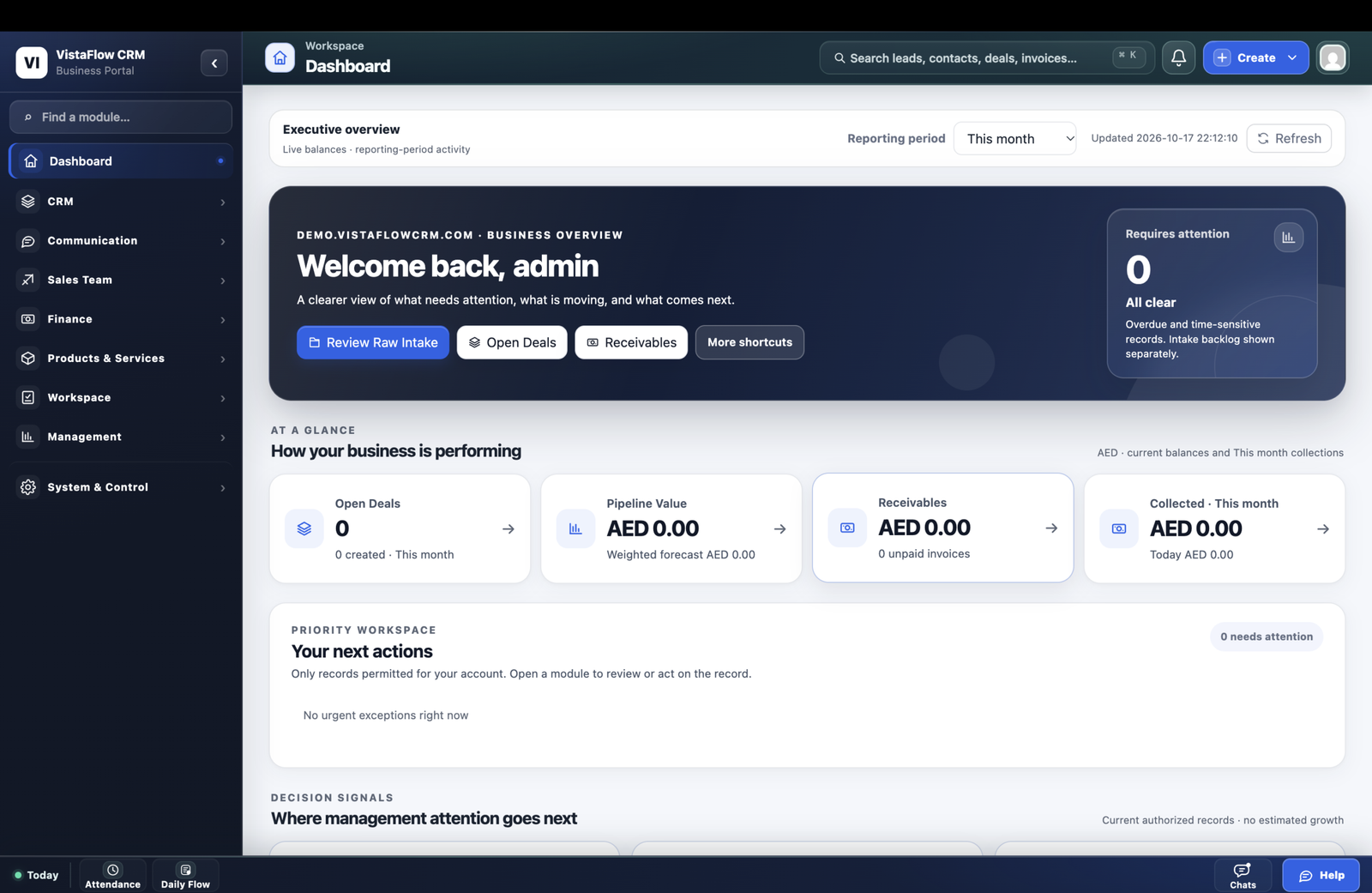
Swipe sideways to explore the dashboard
Customer conversations, sales pipelines, finance and everyday delivery belong to the same business. VistaFlow gives them a shared workspace—without making you juggle unrelated tools for every step.
Raw Intake, Leads, Contacts and Companies.
Ownership, pipeline stages and follow-ups.
Estimates, orders, invoices and payments.
Tasks, reports and management visibility.
Connected records, deliberate conversions and role-based access—organized around your business.
Discover the areas VistaFlow brings into one system. Dive deeper into specific capabilities as your business requires.
Manage inquiries, contacts, companies and deals with a clear view of who owns the next action.
Work with estimates, sales orders, invoices, credit notes, payment records and accounts.
Organize products and stock activity.
Employee 360, tasks, attendance and work reporting.
Review dashboards, priorities and reporting.
Custom fields, documents, permissions and forms.
See how teams use connected records for their own responsibilities. Workflow access depends on the enabled modules and role permissions.
Salespeople follow prospects, conversations and deals with customer context.
Leads · Contacts · DealsFinance teams manage estimates, invoices, receipts and outstanding items.
Estimates · Invoices · PaymentsDaily operations use tasks, product records and delivery workflows.
Business Flow · Tasks · InventoryManagers look at KPIs, business signals and follow-up priorities.
Dashboard · Reports · TeamOne dashboard, several useful perspectives. Explore the actual VistaFlow overview—not a synthetic UI mockup.
Review pipeline value, receivables and collection signals in one executive overview, subject to role permissions.
See how teams use itBuild customer context from new inquiry to managed opportunity. Your sales team sees who is involved, what happened, and what should happen next.
Record new requests in Raw Intake and intentionally create Leads for qualification.
Contacts, Companies, notes and related activities preserve the useful context.
Manage Deals, stages, follow-ups and account responsibilities.
Lead conversion creates the related Company, Contact and Deal. A new Raw Intake record does not automatically create them.
Manage financial documents alongside customers, products and supplier records—without losing the business context.
Prepare estimates, manage orders and invoices, record payments and track outstanding items using enabled finance modules.
Credit Notes, vendors, bills and banking tools support the wider financial workflow.
Maintain product/service information, stock records and operational visibility.
Keep supplier information and payable documents organized.
Manage financial context and account records with appropriate permissions.
Employee profiles, documents, attendance, leave and relevant work information, subject to role permissions.
Connect employee context, daily responsibilities and internal communication in one business workspace.
Organize employee information, documents, attendance, leave and review context.
Assign responsibilities, receive daily updates and enable manager review.
Keep Team Chat and working conversations close to the tasks they support.
Adapt data capture, document layouts and permissions to how your teams work. Communication integrations require supported configuration and validation.
Create supported field types and organize relevant information in CRM records and configured workflows.
Work with configurable estimate, invoice and other supported document templates, including layout elements and terms.
Configure appropriate module-level and record-level access controls where supported by the CRM.
Illustrative configuration preview; selecting a tab makes no CRM changes.
Bring supported incoming information into the customer workflow.
Email, Team Chat and WhatsApp options depend on provider and setup.
Shape supported processes, permissions and responsibilities.
More clarity doesn't have to mean more complexity. Keep the important parts of your business close enough to work together.
Related information across supported CRM and finance workflows.
Appropriate module and record access for different responsibilities.
Supported custom fields, document layouts and business settings.
A quick introduction before we explore how VistaFlow fits your business.
Yes. It includes customer, sales, finance, inventory, team and reporting modules. Availability depends on your configuration and plan.
Yes. Role-based permissions help scope available functions and records to configured responsibilities.
Supported custom fields, document layouts and business settings can be configured to match your workflow.
VistaFlow includes estimates, sales orders, invoices, credit notes and payment records. Payment processing integrations depend on setup.
Yes. Review the genuine dashboard shown above and request a product walkthrough to discuss the modules you need.
Tell us about your processes and our team can discuss the relevant modules, setup and next steps.